

Finances
Get paid.
Without the chase.
Send invoices and collect payments from parents and coaches with Stripe Connect — registration, uniforms, tournaments, and more, tracked in one dashboard.
How it works
From invoice to deposit, in one place
Connect Stripe once — SportX1 handles invoicing, pay links, and reporting from there.
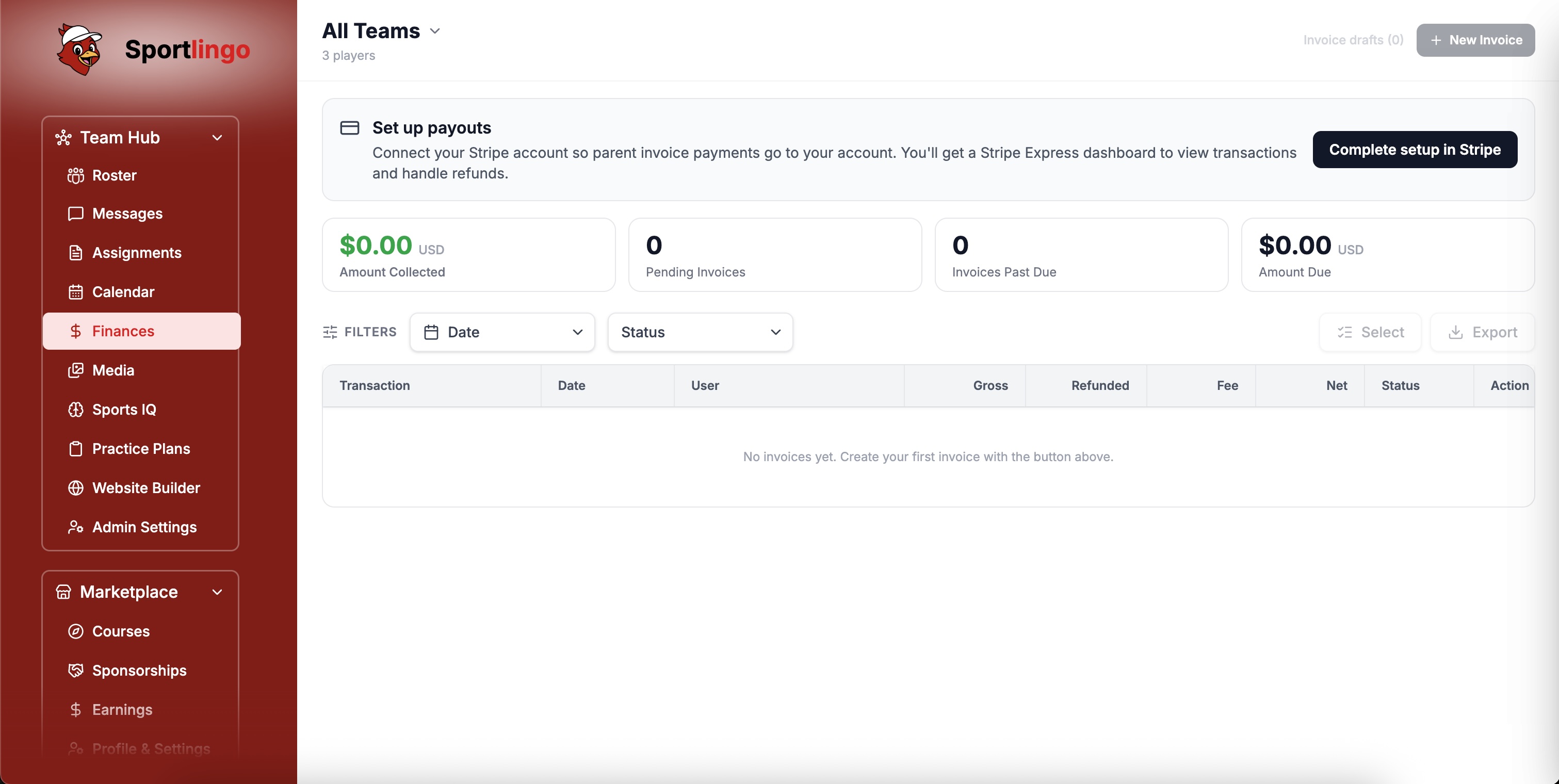
Set up payouts
Connect a Stripe Express account in a few minutes. Once you're connected, every invoice you send routes payment straight to your bank account.
Create an invoice
Add line items by category — Registration, Tryout, Uniform, Equipment, Tournament, Snacks, or a custom category — and choose One Time Payment or Recurring.
Send it out
Pick parents or coaches from your roster, select "All Parents" in one click, or add any email directly. Each recipient gets their own secure pay link.
Track and export
Watch Amount Collected, Pending, and Past Due update as payments come in, then export the filtered table to CSV or Excel, or download a PDF for any invoice.
Why Finances
Built for club and team billing
Six features that make collecting and tracking team payments effortless.
Stripe Connect Payouts
Payments go directly to your own Stripe Express account — SportX1 never holds your funds. Open your Stripe dashboard anytime to view transactions and payouts.
One-Time & Recurring Invoices
Bill a single fee or set up a recurring schedule — weekly, biweekly, monthly, or a custom interval — for things like registration, uniforms, or tournament fees.
Multi-Currency
Invoice in USD, CAD, GBP, EUR, and 10 other currencies — automatically limited to what your connected Stripe account's country can actually charge in.
Pay Links, No Account Needed
Every recipient gets a unique pay link they can open and pay instantly — parents and coaches don't need a SportX1 login to pay an invoice.
Live Collections Dashboard
Amount Collected, Pending Invoices, Invoices Past Due, and Amount Due update in real time, filterable by team, date range, and status.
Export & PDF Receipts
Export your filtered invoice table to CSV or Excel for your own records, or download a branded PDF of any invoice with its itemized costs and status.
In action
A finance dashboard your whole club can trust
Clear balances, real pay links, and exports your board can actually use.
No spreadsheets, no chasing checks
Every invoice, pay link, and payment status lives in one dashboard. Coaches and administrators see who's paid at a glance — no manual tracking required.
Reports your treasurer will actually use
Filter by team, date range, and status, then export to CSV or Excel — or download a branded PDF for any single invoice.
FAQ
Common questions
Who can be invoiced through Finances?+
Parents and guardians, or other coaches — invoices don't go directly to players. You can select specific people from your roster, bulk-select all parents or all coaches, or type in any email address directly.
Where does the money go?+
Directly to your own Stripe Express account via Stripe Connect. SportX1 doesn't hold your funds — you can open your Stripe dashboard anytime to see transactions, refunds, and payouts.
Can I charge a processing fee?+
Yes. You can choose to pass the processing fee on to the recipient, or absorb it yourself — it's a simple toggle when you create the invoice.
Can I set up recurring payments instead of one lump sum?+
Yes. Choose Recurring when creating an invoice and pick a schedule — weekly, biweekly, monthly, bimonthly, every 3 or 6 months, yearly, or a custom interval.
Can I cancel or delete an invoice?+
Yes. A pending or overdue invoice can be cancelled, and cancelled invoices can be permanently deleted — individually or in bulk from the Finances table.
Does Finances replace our club's accounting software?+
Finances handles invoicing and payment collection for your team, with CSV/Excel export and per-invoice PDFs for your own records. Most clubs use it alongside their existing accounting software.
Ready to simplify club payments?
Start your free trial today. No credit card required. Up and running in under 10 minutes.